barest metal GBA, part 1 - boot-up
a tantalizing demon
I first fell into GBA homebrew many years ago, and to this day I still feel its siren's call... I suppose it never truly left my heart. There's just something incredibly satisfying about the console from a developer's perspective - low-level enough to need to work with bare metal but high-level enough to be able to write C, old enough to have interesting custom hardware but new enough to be compatible with modern toolchains, and powerful enough to do amazing things but weak enough to force you to learn and improve.
Plus, it plays video games! And the nostalgia factor, obviously.
I'm sorry to say that I've lost the battle and have run my ship aground. The best I can do now is document the process and force others to share my fate. The truth is, I have no better recommendation to those looking to learn embedded systems or become a Real Programmer, especially since the GBA is much cooler and emulators are much cheaper than a devkit containing equivalent peripherals.
My hope is that this can help others and serve as a more up-to-date lower-level companion to existing guides. For those following along, remember that significant prior programming knowledge is MUCH less important than curiosity, patience, and an ability to accept that we can't know everything at first. I assume no knowledge of assembly language and take care to define anything that isn't easily understandable from a google search.
One last thing - I won't be using any external libraries or tools, partially to demonstrate how things work under the hood, and partially because DevkitARM and its surrounding ecosystem is made by lunatics who think I should have to install an entire copy of Arch's pacman when I already have a better package manager installed.
Can you feel the madness calling?
hello, loop!
The GBA runs on an ARM7TDMI clocked at 16.78 MHz and contains two primary RAM sections, one of 256KB and another of 32KB. It has no operating system or platform support at all, only a simple set of mostly-useless BIOS routines. Although I intend on using C++, half of the language is effectively unusable here - no STL, no exceptions, no libc, nothing except for a small subset of support headers. Although I could add support for all these things, the system is generally too weak for it to be worth it.
If this seems incredibly difficult to work with, don't worry - I was equally intimidated years ago when I first started GBA development, but after having worked on microcontrollers with only 24KB of memory I can promise that the GBA is honestly like a luxury cruise as far as embedded systems go. Although the clock speed is rather slow, there's more than enough RAM to compensate for it via generous amounts of caching, and modern flashcarts and digital storage allow an incredible amount of ROM space for even more precomputations.
First things first, we're going to need a compiler. In target triple terminology, we want an arm-none-eabi toolchain. Go ahead and install this with your system package manager, and if your system doesn't have one, go fix that! Go install msys2 or homebrew/macports like an actual programmer!
With that, we can finally write a shitty demo program. Since there's no OS to return to, we have to keep looping our "game" as long as the console is on:
int main() { for (;;);}
Compile this with arm-none-eabi-gcc main.cpp -nostartfiles -nostdlib. These two flags tell GCC to not use libc or its predefined startup files, as even if it can find them (it can't for me) they're not very useful for us - this isn't a PC, after all. However, running that command will usually display a warning like cannot find entry symbol _start; defaulting to 00008000. This happens because passing -nostartfiles tells GCC not to link against crt0.o, which normally defines _start.
But what exactly is _start? As it turns out, main is just a convention defined by C that has nothing to do with the actual program startup routine. Initialization of global variables, global constructors, and many other Things You Can't Do In C need to be done in _start well before main is called. Why does this exist? Why not just have main do the initialization? Why is it called that? Is it this way for every platform and toolchain? Repeat after me and write this 50 times on the chalkboard: Everything is convention.
However, the GBA has no idea of these conventions, nor what a _start is. We could ignore the warning, or define it as a simple function that calls main, but that won't initialize the hardware or call our code correctly. So, it's time to learn about the GBA and ARM7TDMI startup routines.
next stop: assembly
Every ROM begins at address 0x8000000 with the following 192-byte header, courtesy of the GBA programming manual:
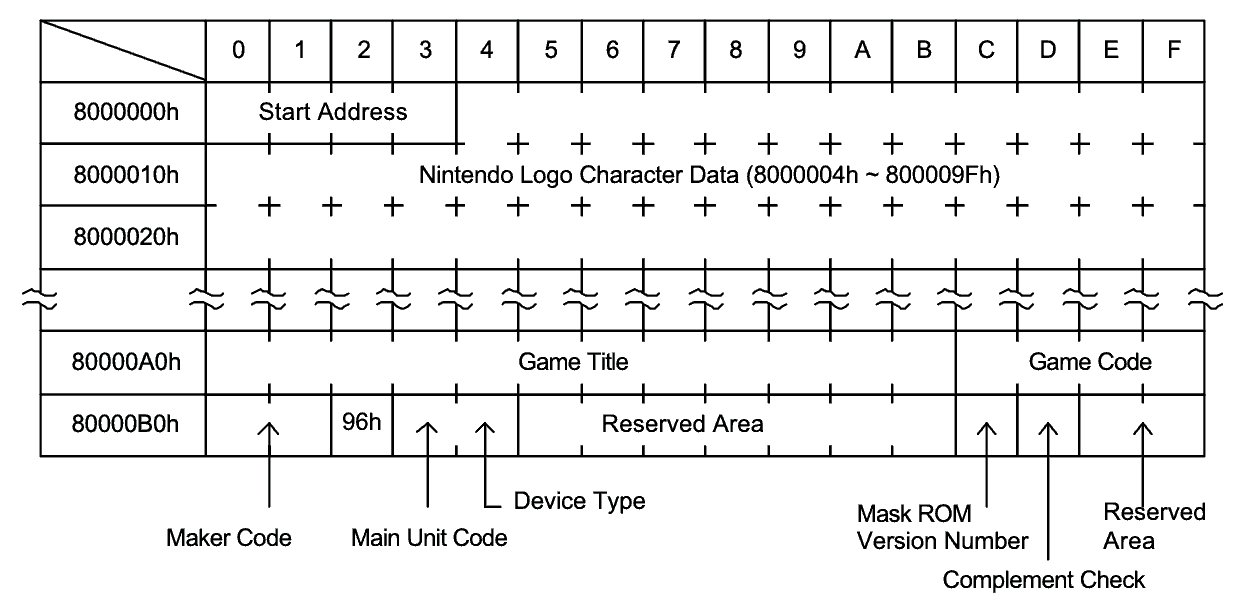
A more in-depth description of all of these fields can be found here or in the official manual on pages 170-171, but for right now we only care about the first 4 bytes. Despite this field being called "start address", it's actually an ARM branch instruction. As for why execution doesn't simply begin after the beginning of the ROM, it beats me - my best guess is that Nintendo didn't want to keep recompiling their test executables during the hardware development process every time they changed the header specification.
We're going to be ignoring the rest of the fields since emulators don't look for them, but you can fill them out if you'd like. I won't be providing the character data myself because I don't want Miyamoto to send a hitsquad after me, but I'm sure it's available online somewhere.
Before I toss assembly at you, I'd like to provide a quick primer for the unprepared. Assembly-land consists almost entirely of directives, symbol definitions, and instructions, the representation and interpretation of which is to some degree unique to the combination of assembler and instruction set. If you're not using the GNU assembler, you might have to translate a bit. Directives are prefixed by a period and tell the assembler to manipulate its output in some way. Symbol definitions are suffixed by a colon and define an identifier with the value of their effective address (more on this later). Everything else except for comments is interpreted as an instruction.
With all that in mind, here's our assembly. Don't panic, because I'll explain it all line by line.
.global rom_headerrom_header: b start .fill 186,1,0.align 2.global _start_start: mrs r0, cpsr bic r0, #0x1F orr r0, #0x10 msr cpsr, r0 ldr sp, =0x3007F00 b main
We start by defining the symbol rom_header and marking it as a "global", meaning that it's visible to other files, for reasons we'll cover later. Next we provide the branch instruction expected by the ROM header and .fill in the rest of the ROM header with 186 1-byte representations of 0. Note that unlike with C variables, we can use symbols before their definition in assembly since there's no way to grammatically confuse them with anything else.
Finally, we can define our _start function. The reasons for this being global are more obvious, as it needs to be exported to the linker for our warning to go away, but the align directive needs a bit of explanation. ARM is a fixed-width ISA where all instructions are 32-bits long and are always aligned to 32-bit boundaries (addresses ending in 0b00). Far from a minor nitpick, this guarantee allows some important architectural optimizations such as defining the branch instruction to always operate in multiples of 4 bytes. On ARM, since align directive will align to 2^x, we pass in a value of 2 to ensure a 4-byte alignment.
The next part is less complicated than it seems. ARM CPUs have several different "operating modes" that we'll explore in later articles such as interrupt, supervisor, or user mode, and each one comes with its own copy of most of the main architectural registers (although some are shared). The mode is controlled via the lowest 5 bits of the Current Program Status Register, which is also responsible for things like condition flags. Since it's good practice to not clobber random flags needlessly, we're going to do a read-clear-or-writeback combination instead of just blindly overwriting things.
With all this done, we can finally switch into user mode, set our stack pointer, and jump to C++! As for why the stack pointer should be at that particular value? Because Nintendo said so on page 159. Everything Is Convention. Now we just have to add init.s as an argument to GCC alongside main.cpp, and we're golden! Congratulations, we've made our first ROM!
everything in its right place
... Except we haven't, not quite. mGBA still refuses to accept it, and looking at the output with arm-none-eabi-objdump -d a.out will make it fairly clear why:
Disassembly of section .text:

00008000 < main >:
    8000: eafffffe b 8000 < main >

00008004 < rom_header >:
    8004: ea00002f b 80c8 <_start>

...

000080c2 < sp_usr >:
    80c2: 7f00      .short 0x7f00
    80c4: 0300      .short 0x0300

...

000080c8 <_start>:
    80c8: e10f0000 mrs r0, CPSR
    80cc: e3c0001f bic r0, r0, #31
    80d0: e3800010 orr r0, r0, #16
    80d4: e129f000 msr CPSR_fc, r0
    80d8: e51fd000 ldr sp, [pc, #-0] @ 80e0 <_start+0x18>
    80dc: eaffffc7 b 8000 < main >
    80e0: 000080c2 .word 0x000080c2
Our C++ main function has hijacked the top spot in our executable where the ROM header should be, and while we're at it, nothing is where it's supposed to be - our code should be starting at address 0x8000000, not 0x8000. So, how do we fix it?
Low-level programs use C, lower-level ones use assembly, but the lowest of low-level programs such as firmware or kernels need to utilize a special kind of file called a linkerscript. As the name implies, these control the linker, the part of the toolchain that takes a bunch of different source files and turns them into one final executable. By controlling the linker, we control how all the pieces of the puzzle fit together. As you can imagine, a surprisingly large amount of conventions are really just particularities of the default linkerscript for a platform.
I cannot overstate how much I hate linkerscripts. Their syntax is ugly, confusing and inconsistent, and GNU ld is incredibly unhelpful in telling you exactly *what* you've done wrong - all it cares to tell you is that some error happened on some line, which I suppose is entirely on brand for a program that is constructed entirely around generated C code mangled and smashed together via cat, sed, and friends. And to think that this piece of shit is one of the foundations of our modern tech ecosystem...
With all that said, here's Baby's First Linkerscript:
ENTRY(rom_header)

SECTIONS
{
  .text 0x8000000 : {
    *(.rom_header)
	*(.text)
	*(.text.*)
  }
}
With this, we've told ld that the real entry point to our program is rom_header and not _start (this is why it had to be marked global earlier), and told it that the output text section should consist of the ROM header followed by every text section from the source files. We're dodging best practice and completely ignoring the other important sections since this is an absolutely bare-minimum example, but please keep in mind that others do exist.
But wait, the rom_header section doesn't exist! To fix this, we can sandwich our header definition between a .section .rom_header and a .section .text , although feel free to omit the latter if you're picky about ensuring all the initialization assembly remains contiguous in ROM. With this, everything is finally in its right place.
For those trying on bare hardware, there's one last tiny hurdle to get over - our toolchain has generated an ELF file, but the expects wants raw bytes! For this, we need to run arm-none-eabi-objcopy -O binary a.out or some equivalent command to strip out the ELF header and other extraneous things. Those running via mGBA might not want to do this, though, as it strips out all the useful debugging information.
success!
With this, we've finally been able to produce a ROM that mGBA accepts! That said, we're still stuck with a blank white screen because we haven't actually written any code to display anything.
If you'd like to verify that the code is actually *running* and not just causing the emulator to freeze, you can start a GDB debug server from inside mGBA and connect to it via command-line GDB with something like target remote localhost:2345 depending on your configuration. From here, entering ni will "step over" to the next instruction.
Next time, we'll get all the pretty pictures up and running!